
26.7.0 Quarterly Release
Changes compared to 26.4.5
Notice
Magnus Box on macOS now requires macOS 12 "Monterey" or later
Any users of macOS 10.13 "High Sierra", 10.14 "Mojave", 10.15 "Catalina", and 11 "Big Sur" should remain on the Magnus Box 26.4.x "Phoebe" quarterly series.
New Features
Model Context Protocol (MCP) support
Magnus Box can now act as a Model Context Protocol (MCP) server, letting you connect AI assistants and agent tooling directly to your Magnus Box Server. Over 100 tools are available covering users, jobs, storage, policies, devices, and server settings, so you can automate routine administration and reporting with the AI tooling of your choice. Tools are read-only by default, with write access available on an opt-in basis. Partners who want to connect an AI assistant can contact support@magnusbox.com to get a dedicated AI access account.
Magnus Box webhook notifications as Slack messages
Magnus Box webhooks can now be formatted as Slack messages. Point a webhook at a Slack Incoming Webhook URL and job notifications render natively in your chosen Slack channel, with no middleware or custom integration needed. Magnus Box support sets these alerts up for you on request: create an Incoming Webhook in your Slack workspace, then email the webhook URL to support@magnusbox.com with the accounts and events you want alerts for.
Enhancements
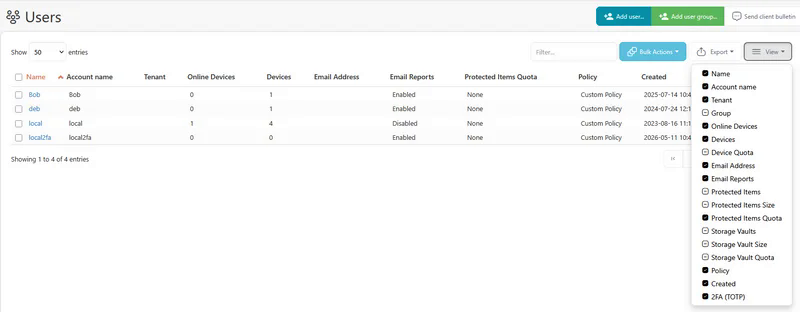
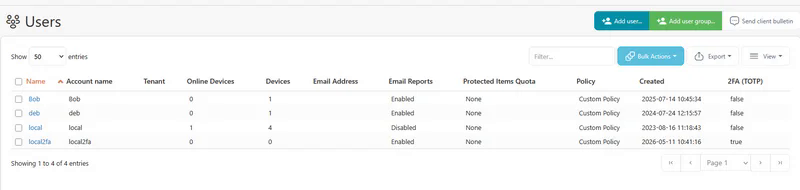
2FA status visible in User list
The Users list in the Magnus Box Management Console now shows each user's two-factor authentication (2FA) status, so admins can audit 2FA coverage across all their accounts at a glance instead of opening each user's detail page.
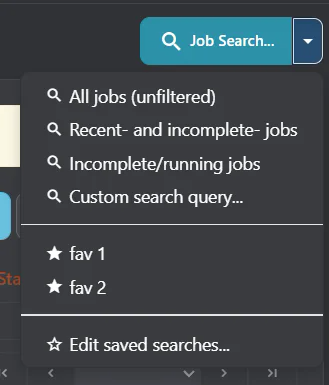
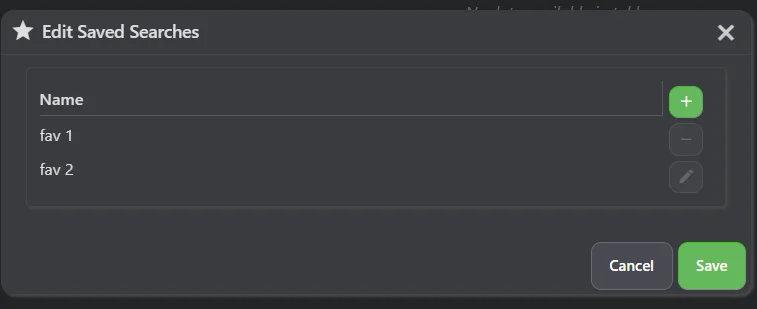
Saved job searches in the Magnus Box Management Console
Job searches in the Magnus Box Management Console can now be saved and recalled, so the filtered views you check regularly are one click away instead of being rebuilt each time.
Policy default schedules applied to policy default Protected Items
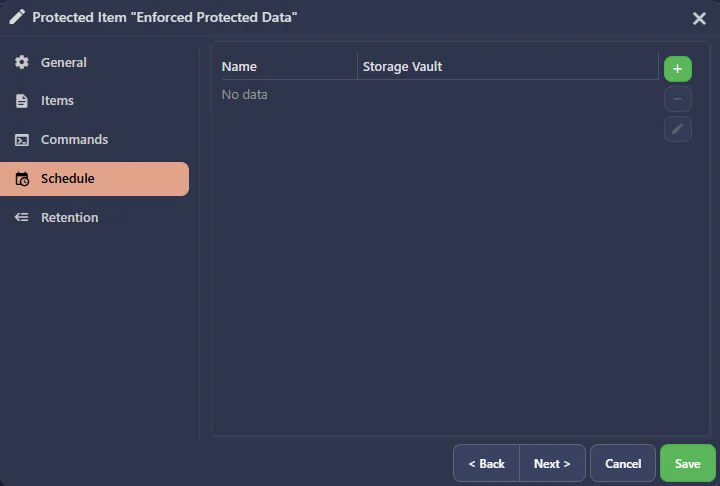
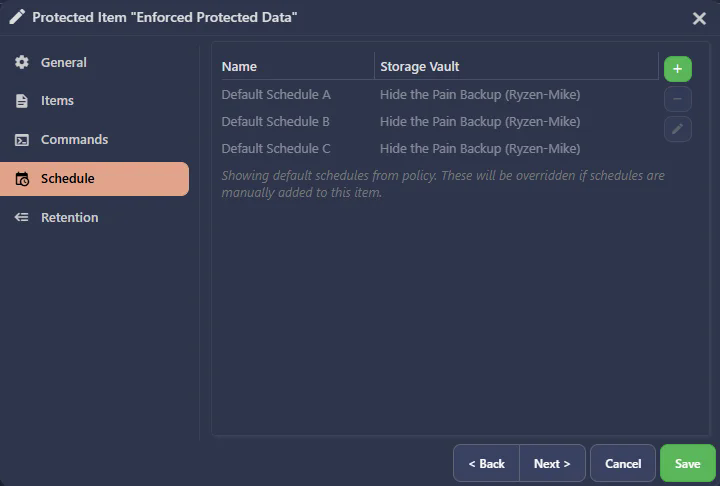
Policy default schedules are now automatically applied to policy default Protected Items that have no schedules of their own, ensuring devices covered by a Policy always end up with a backup schedule in place. For enforced Protected Items, schedules are always applied; for unenforced Protected Items, schedules are applied at Protected Item creation time. Default schedules are shown in a greyed-out, non-interactive state so they can be told apart from explicitly configured schedules.
Linux Sandboxing always enabled for home directory restores
Linux Sandboxing is now permanently enabled for Files and Folders restores to home directories, improving security by keeping restore file writes isolated from the rest of the system.
Improved Missed Backup log details
Missed Backup log entries now indicate whether the target device was online when the backup was expected to run, so you can quickly tell whether a backup was missed because the device was offline or for another reason.
Faster Files and Folders restores on Linux
The Linux restore sandbox has received multiple performance optimizations, and is now bypassed entirely for restores outside home directories, where it is not required — making Files and Folders restores on Linux faster.
Improved Office 365 backup memory efficiency
Office 365 calendar and mail backups now stream events and messages as they are processed, rather than collecting them all in memory before starting. This reduces peak memory usage when backing up large mailboxes.
Faster Magnus Box web interface load times
The Magnus Box Management Console now loads more quickly on initial startup, reducing the time admins and users spend waiting to access the web interface.
Additional Impossible Cloud regions available as Storage Vaults
Magnus Box now supports the eu-west-3 and us-east-1 regions when configuring an Impossible Cloud Storage Vault, giving admins additional options for data residency and lower-latency backups in those geographies.
Other enhancements
- Added support for ML-KEM post-quantum encryption in TLS, helping protect data in transit against future quantum computing threats
- Improved overall performance and reduced memory usage across Magnus Box Server and the Magnus Box Backup client applications
- The pre-built macOS Magnus Box Backup Agent installer now comes with the server URL pre-filled, so end users only need to enter their credentials to log in
- Cross-device restores in the Magnus Box Backup desktop client now show a temporary Protected Item entry for the restore, so you can see and monitor the restore's progress
- The Magnus Box Backup desktop client's granular restore wizard now displays disk partition sizes, matching the Magnus Box Management Console and making it easier to pick the right partition to restore
- Improved the performance of Magnus Box Server user APIs, particularly with larger user profiles, for a more responsive Magnus Box Management Console on busy servers
- Improved performance of the Magnus Box Backup desktop app when rendering main screen charts
- Added an in-process DNS cache, on by default for Linux and macOS, which typically lack an OS-level DNS cache, cutting repeated DNS lookups during backup and storage operations
- The Magnus Box Backup desktop app now communicates with its background service more directly, making the app more responsive
- Bulk Update Campaigns now skip devices whose operating system is not supported by the new software version, rather than upgrading them to a version they cannot run
- Bulk Update Campaigns now send the update to busy devices as soon as their running backup job finishes, so campaigns complete sooner without interrupting backups
- Improved performance when making settings changes in the Magnus Box Backup desktop application
- Improved high DPI display support for Magnus Box Backup on legacy x86_64 macOS machines
- Email reports can now be given an optional Name, shown in the report list in both the Magnus Box Management Console and the Magnus Box Backup desktop app, making it easier to tell apart multiple reports of the same type
Bug Fixes
- Fixed an issue with the Magnus Box API to prevent Admin with enforced policies from creating a policy and/or assigning an existing policy
- Fixed an issue causing VMware virtual disk crashing when restoring root level files
- Fixed an issue causing a second password entry to be required when logging into the Magnus Box Backup desktop app
- Fixed an issue causing client-side jobs to not run on schedule in some rare edge cases
- Fixed an issue with generating the Linux Recovery Media on a Linux distribution that uses tmpfs
- Fixed an issue with cross-restore from Proxmox to Hyper-V or VMware when a CD-ROM was present in the backup source
- Fixed an issue causing the Magnus Box Backup desktop app job log to show some jobs as in progress when they were actually finished
- Fixed an issue with timestamp boundaries when calculating the time to create Missed backup job entries
- Fixed an issue causing the VM list to be empty when restoring from a VMware backup that had no disks
- Fixed an issue causing user profiles to become inaccessible when virtual disk drivers report extremely large partition sizes in Disk Image backups
- Fixed an issue causing Office 365 calendar backups to get stuck due to a bug in the Microsoft Graph API
- Fixed an issue causing a resource leak in Office 365 backups
- Fixed an issue causing a memory leak in Office 365 backups
- Fixed an issue causing Office 365 calendar incremental backups to fail to fall back to a full backup when the previous snapshot was corrupted
- Fixed an issue causing Office 365 backup cancellation to produce excessive log output
- Fixed an issue causing Office 365 mail folder byte statistics to be incorrectly calculated as zero
- Fixed an issue causing the Magnus Box Server event dispatch to connected clients to be blocked in some conditions
- Fixed an issue with the Protected Item dialog table overflow behavior when a large number of rows are rendered
- Fixed a cosmetic issue with inconsistent reporting of Proxmox VM memory sizes
- Fixed a cosmetic issue with "osascript" popups when logging into Magnus Box Backup on macOS
- Fixed an issue with incorrect timezone calculations in the Magnus Box Server web interface
- Fixed an issue with adding new admin users
- Fixed an issue causing live connected devices to fail to reconnect after a password change in the Magnus Box Management Console
- Fixed an issue with starting sessions
- Fixed an issue with obtaining TOTP codes
- Fixed an issue causing Office 365 backups to potentially skip "calendars" and "contacts" in some cases where duplicate items are found
- Fixed an issue causing the configure button to be shown while performing a cross-device restore on a Magnus Box Backup desktop client with no Protected Item available to edit
- Fixed an issue in the Magnus Box Backup desktop app where scheduled backup jobs could run immediately instead of at their scheduled time, which could cause scheduled backups to be missed
- Proxmox backup and restore now works for volumes in linked clones
- Fixed an issue with live connection APIs when logged in to the Magnus Box Management Console as an end-user
- Fixed an issue with user quota enforcement
- Fixed an issue with multi-factor Authentication in Magnus Box Management Console to prevent TOTP codes from being used in the same time window
- Fixed an issue with missing "Other devices" usage information in the chart screen in the Magnus Box Backup desktop app
- Fixed an issue causing the MSI Backup Agent download to start twice from the Download Backup Agent page of the Magnus Box Management Console with unauthenticated downloads disabled
- Fixed an issue causing concurrent backup jobs to fail with "No encryption key is available" on the first backup to a newly created Storage Vault
- Fixed an issue causing the list of connected devices to be displayed in an arbitrary order in the Run Backup and Restore dialogs of the Magnus Box Management Console; the list is now sorted alphabetically by device name
- Fixed an issue causing "ResizeObserver" messages to appear in the Magnus Box Management Console web interface when using incompatible browser extensions
- Fixed an issue causing Disk Image backups to spuriously warn that data "may be corrupt or inconsistent" when a volume's Volume Shadow Copy was read without exclusive access; a shadow copy is immutable, so the read is consistent and the warning is no longer shown
- Fixed an issue causing Magnus Box to reinitialize Storage Vaults and wipe encryption keys in some cases of temporary network connection loss
- Fixed an issue causing retention to fail rather than retry when S3-compatible Storage Vault are interrupted
- Fixed an issue causing the retention-pass status of a non-editable Storage Vault to be reverted when a backup job tried to clear it, which previously left the status stuck and forced a redundant retention pass to re-run on every subsequent backup job
- Fixed an issue causing device registration to fail in the Magnus Box Backup desktop app when TOTP is enabled, instead of prompting for a TOTP code
- Fixed an issue causing the Magnus Box Backup desktop app to repeatedly prompt to log in after a TOTP-authenticated device registration
- Fixed an issue causing a Policy "latest Storage Vault" backup schedule on an existing Protected Item to swap to a newer Storage Vault in certain circumstances
- Fixed an issue causing installation of the macOS client on unsupported older versions to be allowed
- Fixed an issue where the Storage Vault content analysis at the end of a retention pass could fail permanently once concurrent jobs had left duplicate packindex files for a snapshot
- Fixed Linux Disk Image snapshot driver installation on systems where the default temp directory is mounted
noexec - Fixed Linux Recovery Media ISO generation on systems where the default temp directory is mounted
noexecornodev - Fixed an issue with rate limit message handling on S3-compatible storage locations
Changes compared to 26.5.4
Bug Fixes
- Fixed an issue where the Storage Vault content analysis at the end of a retention pass could fail permanently once concurrent jobs had left duplicate packindex files for a snapshot
- Fixed Linux Disk Image snapshot driver installation on systems where the default temp directory is mounted
noexec - Fixed Linux Recovery Media ISO generation on systems where the default temp directory is mounted
noexecornodev - Fixed an issue with rate limit message handling on S3-compatible storage locations
- Fixed an issue where restoring a Proxmox virtual machine onto ZFS storage could fail with "dataset already exists" if a leftover disk volume from a previous restore or an earlier VM with the same VM ID was present on the storage pool